<!DOCTYPE html>
<html lang="en">
<head>
    <meta charset="UTF-8">
    <title>Math 객체를 이용한 계산기</title>
</head>
<style>
    #num{
        color: blue;
    }
    #op{
        color:green;
    }
    #tr{
       color:red;
    }
</style>
<script>
    var calNum="";
    var fakeCal="";
    var flag=false;
    function view(self){
        var textType=document.getElementById("textType");
        if(textType.value==0 || flag==true){
            textType.value=self.value;
            calNum=calNum+textType.value;
        }else{
            textType.value=textType.value+self.value;
            calNum=textType.value;
        }
    }
    function op(self){
        calNum=calNum+self.value;
        fakeCal=calNum;
        flag=true;
    }
    function cal(){
        var result=eval(calNum);
        textType.value=result;
        calNum=result;
    }
    function neg(){
        var check = textType.value
        check=-1*check;
        textType.value=check;
        calNum=fakeCal+" "+check;
    }
    function tri(self){
        var triResult="";
        if(self.value=='sin'){
            triResult=Math.sin(textType.value*Math.PI/180);//sin 수식
        }else if(self.value=='cos'){
            triResult=Math.cos(textType.value*Math.PI/180);//cos 수식
        }else if(self.value=='tan'){
            triResult=Math.tan(textType.value*Math.PI/180);//tan 수식
        }
        textType.value=triResult;
        calNum=fakeCal+triResult;
    }

    function res(){
        calNum="";
        fakeCal="";
        flag=false;
        triResult="";
    }


</script>
<body align = "center">
    <form>
        <div>
            <input type="text" id="textType" name="" value="0" style="text-align: right;">
        </div>
        <div>
            <input type="reset" value="Clear" style="width: 80px;color: blue;" onclick="res();">
            <input type="button" value="=" style="width:80px;color: blue;" onclick="cal();"><br>
        </div>
    </form>
    <div>
        <input type="button" id="num" value="1" onclick="view(this);">
        <input type="button" id="num" value="2" onclick="view(this);">
        <input type="button"  id="num" value="3" onclick="view(this);">
        <input type="button" id="op" value="+" onclick="op(this)">
        <button value="**" id="tr" onclick="op(this)">x^y</button><br>
        <input type="button"  id="num" value="4" onclick="view(this);">
        <input type="button"  id="num" value="5" onclick="view(this);">
        <input type="button"  id="num" value="6" onclick="view(this);">
        <input type="button" id="op" value="-" onclick="op(this)">
        <input type="button" id="tr" value="sin" onclick="tri(this);"><br>
        <input type="button"  id="num" value="7" onclick="view(this);">
        <input type="button"  id="num" value="8" onclick="view(this);">
        <input type="button"  id="num" value="9" onclick="view(this);">
        <input type="button" id="op" value="*" onclick="op(this)" >
        <input type="button"  id="tr" value="cos" onclick="tri(this);"><br>
        <input type="button"  id="num" value="0" onclick="view(this);">
        <input type="button" value="+/-" onclick="neg()">
        <input type="button"  value="." onclick="view(this);">
        <input type="button" id="op" value="/" onclick="op(this)">
        <input type="button" id="tr" value="tan" onclick="tri(this);">
    </div>
</body>
</html>
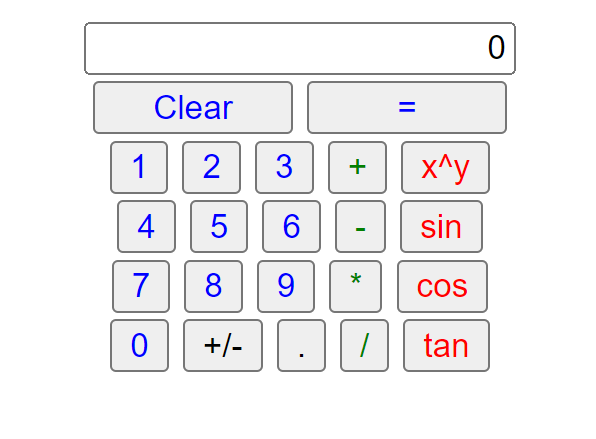
코드가 현재 스파게티 코드처럼 꼬여있고 css를 별로 안 건들여서 ui가 별로지만 기능적으로는 아주 훌륭하게 작동하게 됐다.. 시간이 날 때 css를 넣어 꾸며야겠다..
'http, css, js' 카테고리의 다른 글
| 유효성검사(비정규식) (0) | 2022.09.14 |
|---|---|
| 유효성 검사(정규식사용) (1) | 2022.09.14 |

댓글